1. Your first instance
In this chapter you will start one private chain, identify its endpoints, and watch a second one be thrown away. The next chapter will explain what the three services behind those endpoints do.
An instance is one named set of services, data, and loopback ports. It can
use native processes or Docker containers. The default name is default. Starting it
again creates a fresh chain and wallet after cleanup succeeds; stopping
it requests deletion of its data. Check the command result before assuming
cleanup completed.
Start without Docker
Use macOS 12 or newer, or Linux with glibc 2.35 or newer, on Intel or ARM.
For a release with native bundles, the installer verifies and installs the
launcher, Zakura, lightwalletd, ths-server, and dashboard together:
curl --proto '=https' --tlsv1.2 -fsSL https://raw.githubusercontent.com/zcashlabs/thus-spoke-zakura/main/install.sh | THS_INSTALL_RUNTIME=native sh
ths doctor --native
ths start --native --no-open
This path needs neither Docker nor Python. Keep the launcher terminal open.
Native startup chooses free loopback ports; read them with ths endpoints --json. Ordinary commands such as ths wallet, ths mine, ths reorg,
ths wait, and ths stop use the recorded backend automatically. A second
native instance only needs a different name: ths --name alice start --native.
The runtime lives beside the installed executable under .ths-runtime/<version>.
--runtime-dir DIR or THS_RUNTIME_DIR selects a locally built bundle. The
launcher checks its version, platform, and component pins before startup. See
development to build from source before native assets have
been published.
Use ths update to update a native installation.
It installs the new immutable runtime before replacing the launcher.
Previous bundles remain available to running instances. Reinstalling the same
version verifies its files and refuses to overwrite a modified bundle. Uninstall
removes only the launcher; remove unused bundles manually after their instances
have stopped.
When moving from a launcher released before native support, rerun the public
installer above. Older launchers embed their original installer, so their
ths update command does not install native bundles.
The rest of this chapter walks through Docker startup. Its fixed ports, containers, images, and volumes apply to Docker; the wallet and API behavior is shared by both backends. Native shutdown asks its owning launcher to stop the services and delete that instance’s data. If the owner has died, THS retains the data and reports uncertain cleanup instead of trusting stored process IDs.
Docker startup
An image is the built template from which Docker starts a container; changing source files does not alter an image that already exists.
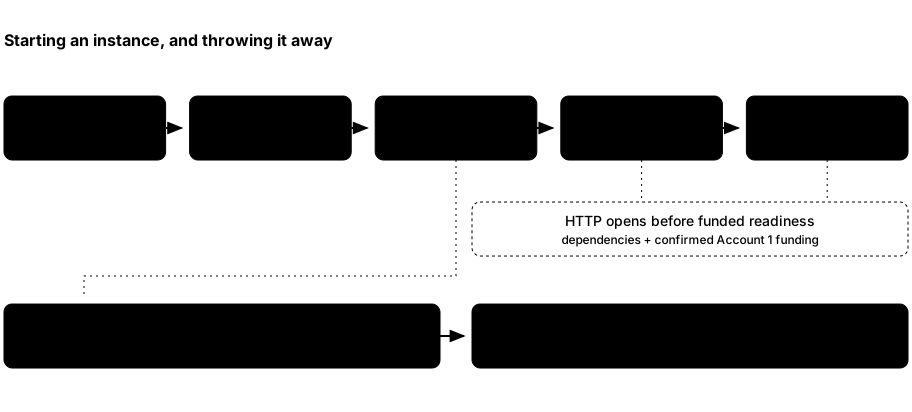
thschecks Docker and the required images.- It removes leftovers for the selected instance name, then creates its network, volumes, and containers. Other names are untouched.
- An init container creates the seed, account records, wallet database, and Zakura Regtest configuration. Zakura starts, then lightwalletd, then the app.
- The app synchronizes its wallet and provisions Account 1. The launcher prints the ready line and endpoints after its app readiness probe succeeds.
- Ctrl+C, a termination signal, or a partial startup failure triggers cleanup of that instance’s resources and metadata. Check the command result; failed or uncertain cleanup retains recovery metadata.
Prepare Docker
Install Docker Desktop on macOS or Docker Engine/Desktop on Linux. Start it and confirm that both the client and daemon respond:
docker version
The server section must respond without sudo. If it does not, fix Docker
access before continuing. ths doctor performs the same basic Docker
reachability check after installation.
Install the launcher
The installer supports Intel and ARM macOS and Linux. It verifies the
release archive’s SHA-256 digest, installs ths in ~/.local/bin by default,
and pulls matching runtime images:
curl --proto '=https' --tlsv1.2 -fsSL https://raw.githubusercontent.com/zcashlabs/thus-spoke-zakura/main/install.sh | THS_INSTALL_RUNTIME=docker sh
ths --version
ths doctor
The unpinned command selects the latest published release. To explicitly
request an exact release version, such as 0.3.0, set THS_VERSION on
the installer process:
curl --proto '=https' --tlsv1.2 -fsSL https://raw.githubusercontent.com/zcashlabs/thus-spoke-zakura/main/install.sh | THS_VERSION=0.3.0 THS_INSTALL_RUNTIME=docker sh
The installer reads these environment variables: THS_INSTALL_DIR chooses the
destination directory (default ~/.local/bin), THS_VERSION installs an exact
release instead of the latest. THS_INSTALL_RUNTIME accepts auto (the default),
native, docker, or none (launcher only). auto selects native when the
destination contains a .ths-runtime directory; otherwise it selects Docker.
Explicit choices override that detection without removing older bundles. Native
updates fail without replacing the launcher if the matching bundle is missing
or invalid. THS_SKIP_IMAGE_PULL=1 skips the Docker image
download. In Docker mode the image pull happens before the binary is moved into place, so
if Docker is not running the installer aborts with nothing installed. Start
Docker first, or install with THS_SKIP_IMAGE_PULL=1 and run ths pull later.
If ths in the destination is a directory or a symlink to a directory, the
installer stops without changing its contents. An existing executable is replaced.
If your shell says ths: command not found, either the install aborted or
~/.local/bin is not on PATH. See troubleshooting for
the exact checks.
If you are working from a clone, use the source build instructions instead. The launcher uses Docker images, so a source edit does not automatically change a running app.
Start the running example
Open a terminal and run it there. Keep that terminal open; --no-open only
skips opening the browser, and the dashboard still runs. The launcher ends
with:
$ ths start --no-open
default is ready 🌸
  Dashboard    http://127.0.0.1:32805
  Zakura RPC   http://127.0.0.1:18232
  lightwalletd http://127.0.0.1:9067  (network=regtest, tls=false)
  P2P          127.0.0.1:18233
There is no fixed sleep interval that means the wallet is ready; wait for
default is ready. Startup time depends on Docker, image availability,
reward maturity, indexing, and wallet synchronization.
What scrolls past before that line
Everything above default is ready is the launcher narrating its work, and
it is noisier than the result. You will see Preparing a fresh default environment…, Starting default…, then raw Docker network, volume, and
container IDs, because ths lets Docker write to your terminal directly.
Interleaved with those IDs, the init container prints the instance’s
secrets: a ⚠ DISPOSABLE REGTEST SECRETS banner, the BIP-39 mnemonic,
and for each of the five development accounts its unified address and its
unified spending key in hex. That is deliberate. These are the supported
way to import one of these accounts into an external wallet, and they are
safe to print because they protect nothing — Chapter
3 explains why.
A fresh chain already has 103 blocks
Before Account 1 can hold anything, the treasury must have a spendable
mining reward, and a coinbase reward is not spendable until it has matured
by COINBASE_MATURITY_BLOCKS (100) confirmations. So startup mines through
maturity, shields a reward into the treasury, and pays Account 1 its 5
Ironwood ZEC. A newly ready instance therefore sits at height 103, with
the wallet fully scanned to the same height. Nothing is wrong; the Network
page just does not start at 0.
Read the endpoints from a second terminal
In a second terminal, inspect the same instance:
$ ths status
default: running
  Dashboard    http://127.0.0.1:32805
  Zakura RPC   http://127.0.0.1:18232
  lightwalletd http://127.0.0.1:9067  (network=regtest, tls=false)
  P2P          127.0.0.1:18233
ths status reports the combined app, Zakura, and lightwalletd container state
and prints endpoints. It exits nonzero unless all three services are running.
It does not report the node height or wallet scan status; use ths wait
when a script needs the node, index, and wallet settled at one tip.
ths endpoints --json reports these keys:
| Key | Owner and purpose |
|---|---|
dashboard | HTTP URL for the React UI and /api/v1/ server API. |
rpc | Zakura’s local JSON-RPC URL. |
lightwalletd | Plaintext lightwalletd gRPC endpoint for local clients. |
p2p | Zakura’s local peer address. |
network | The chain this instance runs: always "regtest". |
tls | Always false; nothing here uses TLS. |
ths start uses fixed defaults, all published on 127.0.0.1: dashboard
32805, Zakura RPC 18232, P2P 18233, lightwalletd 9067. They do not
change between runs, and the launcher never picks a substitute — if one is
occupied, startup fails and names it. ths start --port-offset <N> shifts
all four by N, which must be a multiple of 10; that is the only thing that
moves them. Scripts should still read ths endpoints --json rather than
hard-code a port, because a given instance may have been started with an
offset. ths open opens the dashboard for you.
The dashboard’s Network page or GET /api/v1/status shows node height and
wallet sync state if you need more than process status.
Give another experiment its own name
A second instance needs its own ports. Since every ths start wants the same
four defaults, the name alone is not enough:
$ ths --name alice start --no-open
Preparing a fresh alice environment…
Starting alice…
Error: port 32805 is already in use on 127.0.0.1
Give it an offset instead:
$ ths --name alice start --no-open --port-offset 10
alice is ready 🌸
  Dashboard    http://127.0.0.1:32815
  Zakura RPC   http://127.0.0.1:18242
  lightwalletd http://127.0.0.1:9077  (network=regtest, tls=false)
  P2P          127.0.0.1:18243
Address that instance with the same global option:
ths --name alice status
ths --name alice endpoints --json
Each name gets its own chain, wallet, volumes, and cleanup. The offset belongs
to the start that created the instance; later commands find its ports from
the instance record.
Stop deliberately
Stopping is not a crash to recover from — it is how the environment is meant
to end. Try it on alice, which you do not need again. Return to the
terminal running it and press Ctrl+C. The launcher attempts to delete
that instance’s containers, volumes, chain, seed, keys, and test funds.
Check the command result before assuming deletion completed. default is
untouched. If you need a result out of an instance, copy it out before stopping.
You can also run ths --name alice stop from another terminal. Once ready,
the foreground launcher watches the allocated app container by ID: deletion
by stop or reset ends that run without a second cleanup pass. A Docker
inspection error is unknown state, not proof of deletion.
If an interrupted process left resources behind, ths --name alice reset --force attempts cleanup of only alice and its volumes. Verified deletion
is irreversible; failed or uncertain cleanup retains recovery metadata as
described above. Never use Regtest addresses or keys for real ZEC, and never
publish these local services beyond loopback.
Leave default running. Chapter 4 funds and
spends on it. If you do stop it, start it again with ths start --no-open;
after successful cleanup you will get a fresh funded chain with the same five
accounts, but every block, transaction, and balance from this run will be gone.
What you learned: ths controls an instance, not a persistent wallet.
Data belongs to a particular run, and the ports belong to the instance’s
offset. Next: meet the services inside the
instance.