Appendix C: Troubleshooting
Start by locating the layer that failed. A launcher can be stopped while Docker is healthy; Zakura can have a new block while the wallet is still scanning; and an activity row can exist before its transaction confirms. The state ownership chapter explains those layers, and Chapter 6 explains uncertain payment responses.
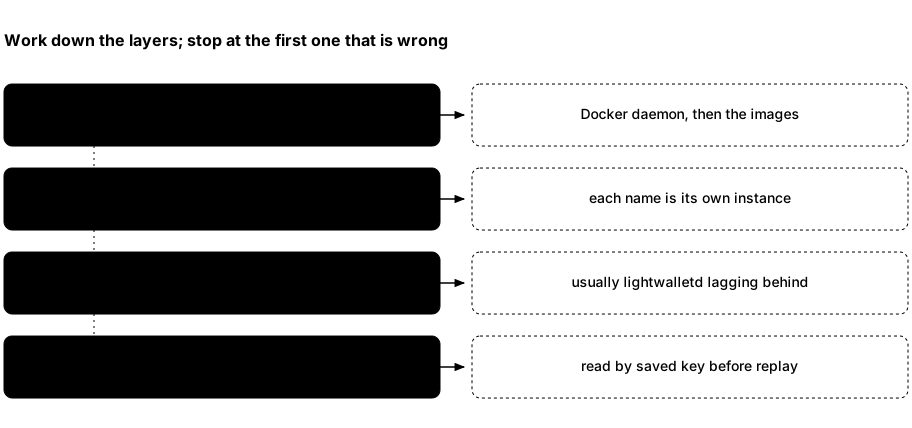
- If
thscannot prepare an instance, start with Docker access and required images. - If the instance is running, get its endpoints and node status.
Ports are fixed per instance, but a second instance was started with a
--port-offset, so confirm you are talking to the name you mean. - If the node is healthy but Wallet looks stale, inspect wallet reconciliation state and logs, not the chain height alone.
- If a request timed out, inspect the operation’s recorded activity or node tip before deciding whether another write is safe.
Establish which instance you are using
In a second terminal, replace alice with your instance name:
ths --name alice status
ths --name alice endpoints --json
ths --name alice logs app
Omit --name alice for default. ths status reports the combined app,
Zakura, and lightwalletd container state; it does not show the node height
or wallet settlement. Use ths wait for settlement. The Network page and
GET /api/v1/status show node height and wallet sync status.
An instance keeps the same ports across runs; a different instance has
different ports only because it was started with a different
--port-offset.
Match the symptom to the next observation
| What you see | What it means and what to do |
|---|---|
Docker is not reachable | Run docker version. Its server section must respond without sudo. Start Docker Desktop or the daemon, then run ths doctor. |
docker ... failed (...) | The launcher names the Docker command it was running and its exit status. Run that command yourself to see the real reason. A failure with no text after the status means Docker printed nothing at all, so check docker version first: the daemon is usually stopped, out of memory, or was killed mid-call. |
ths: command not found after installation | Two different causes. Either nothing was installed — the installer runs ths pull before moving the binary into place, so with Docker stopped the image pull fails and leaves no executable; start Docker and rerun, or rerun with THS_SKIP_IMAGE_PULL=1. Or it installed fine and ~/.local/bin is not on PATH; check with ls ~/.local/bin/ths, then fix PATH or reinstall with THS_INSTALL_DIR set to a directory already on it. |
port 32805 is already in use on 127.0.0.1 | Host ports are fixed defaults, and the launcher names the occupied one instead of choosing another. Usually another instance already holds it: run ths list. Start this one with ths --name <NAME> start --port-offset 10 (any multiple of 10) to shift all four of its ports. |
required image ... is unavailable | An installed launcher can run ths pull. From source, run cargo run -p thus-spoke-zakura -- build --dev. Start again after the images are present. |
| A source edit does not appear in the normal dashboard | The launcher runs an image, not live source. Rebuild with cargo run -p thus-spoke-zakura -- build --dev and start a fresh instance. Vite iteration has its own source workflow. |
instance alice does not exist or an endpoint is wrong | Run ths list, which prints every known instance with its dashboard URL. Use the same --name for every command and read its ports from ths --name alice endpoints --json. |
Startup never reaches alice is ready | Read the launcher’s printed error first. While the relevant container still exists, use ths --name alice logs zakura -f, ths --name alice logs lightwalletd -f, or ths --name alice logs app -f. Startup has bounded phases and waits for dependencies, wallet sync, and Account 1 funding; a failed start attempts cleanup. Preserve any reported lifecycle-recovery.json when cleanup fails or remains uncertain. |
| A send, faucet, or mining POST returns 503 during startup | Side-effecting POSTs require startup to finish. Health returns 200 only after startup completes, the node responds, and a wallet snapshot has been published. While dependencies are unavailable, use the local read-only key lookups below to observe saved payments; POST replay can wait. |
| Wallet says data may be stale | Read GET /api/v1/status: wallet_sync.state, wallet_sync.error, observed and fully scanned heights and hashes. Check ths logs lightwalletd -f and ths logs app -f. Wait for a ready snapshot before relying on balances; require settled: true if node/index/wallet alignment matters. The server retries background reconciliation. |
| A send reports insufficient spendable funds | Run ths wallet quote --from <N> --source-pool <POOL> --destination-pool <POOL>, or ask POST /api/v1/send/quote for that account and pool route: it dry-runs a proposal and returns available_zatoshi, fee_zatoshi, and max_zatoshi without broadcasting. Compare your amount with max_zatoshi, not with the displayed total, which may include a different pool, pending change, or funds not yet spendable. Also confirm wallet sync is ready. |
Faucet or send returned broadcast activity | Save the txid and inspect activity and chain inclusion. Background checks can confirm account activity before wallet settlement. Pending dashboard sends and faucets retain their keys and exact details; use Resume. CLI payments retain journaled keys until terminal observation; rerun the same arguments and instance to resume. Use the caller table before another submission. |
| A mine request timed out or errored | Read the latest job through GET /api/v1/mining/jobs, then inspect canonical height and tip hash. Admitted work survives a disconnected client or the CLI’s 300-second timeout. progress_uncertain means acknowledged progress is a lower bound; sync failure can retain the full count while the job is failed. CLI reruns use fresh keys, so do not repeat the count blindly. See Chapter 5. |
Use ths logs app, ths logs zakura, or ths logs lightwalletd
for recent output; add -f to follow. ths doctor checks Docker
connectivity, not wallet health.
A payment response was lost
Keep the original request details, any caller-controlled key, and any txid.
Direct API callers replay identical details with the same key. A changed valid
payment or memo under that key returns 409. Pending dashboard sends and
faucets retain their key and exact details across dialog closure, refresh,
and browser restart. Use Resume; a broadcast response does not clear the
key. Terminal confirmed or failed results release it. CLI account/address
faucets retain journaled keys through pending results and errors; retry the
same arguments and, for a partial account batch, the same account selection.
CLI send, shield, and unshield also retain journaled keys for the same resolved
intent through pending, unknown, or rejected results. They submit once per
invocation and poll keyed status for up to 30 seconds. Rerun unchanged arguments
and the same instance to resume; a terminal result clears the key, so a later
identical invocation can create a new payment.
Observe before another POST. GET /api/v1/activity?idempotency_key=<key>
returns a one-item array or [] from local storage. Activity still omits the
key from its objects. GET /api/v1/faucet/address?idempotency_key=<key> returns
stored internal or external faucet status, or 404. Both are read-only and
available during startup dependency outages. Activity and address-faucet
responses include nullable last_error; a null value does not prove that the
last request succeeded.
No matching record does not prove nothing happened. External faucet records
remain separate from account activity. Local reads do not progress payments;
accepted payments, including external faucets, can progress in the background.
Check chain state by txid where available and balances through the accounts
snapshot.
confirmed activity and status.settled answer different questions: inclusion
observed by the server and full node/index/wallet alignment, respectively.
See Chapter 6
for payment preparation, recovery, and retry boundaries.
Reset only when you mean to lose this instance
If an interrupted run left this instance’s resources, ths --name alice reset --force attempts to remove its containers and volumes. Verified
cleanup permanently deletes its chain, wallet, seed, keys, and test funds.
It does not remove another named instance. Ctrl+C triggers cleanup in a
normal foreground run; external stop or reset deletion also ends that
run once it observes the allocated app container disappear.
Cleanup gets a separate 120-second budget. An incomplete cleanup means owned
resources are known to remain; an uncertain cleanup means their outcome could
not be proved. Either causes a nonzero exit. Keep lifecycle-recovery.json
and any remaining instance.json at the path reported by the launcher.
Restore Docker connectivity, then retry ths --name alice reset --force
for that same instance. Do not delete recovery files by hand, retry an
unknown create, or prune shared Docker resources. Recovery validates recorded
allocation identities; it does not adopt a same-name replacement or remove
resources from another instance. If the original container cannot be identified,
the launcher keeps its recovery state rather than risking another container.
A network or volume create that has begun is never stopped part way: Ctrl+C
or stop waits for it, and one that times out is left running. Cleanup
settles a create that never recorded its result only after ps shows no
docker create for that resource still running. Then a resource with this instance’s
label is removed, a missing one is recorded as absent, and a same-name
resource of anything else is kept and reported.
This environment is Regtest only. Its seed is fixed and public, so these
addresses and keys are known to anyone who has read the project. Never use
them for real ZEC, and never expose these local services beyond
127.0.0.1.