7. Connect your application
By now you have seen one payment from the dashboard down to Zakura and back to the wallet snapshot. An integration needs to choose the owner of the data it wants, then connect to that owner’s local interface.
- Use the dashboard HTTP API when your program needs user accounts, reconciled balances, activity, or the server’s wallet sync status.
- Use Zakura JSON-RPC for the node tip, blocks, raw transactions, and mempool state. Those facts do not tell you which Ironwood notes your development wallet can spend.
- Use lightwalletd gRPC when building a compatible light client that scans compact blocks itself. The local service uses plaintext transport.
- Use
ths endpoints --jsonto discover host ports. All published addresses are on127.0.0.1; the instance’s Docker-internal names are a different network.
Discover the current instance
Keep ths running in one terminal. In another:
ths endpoints --json
For a named instance, use ths --name alice endpoints --json instead. The
default instance reports:
{
  "dashboard": "http://127.0.0.1:32805",
  "rpc": "http://127.0.0.1:18232",
  "lightwalletd": "http://127.0.0.1:9067",
  "p2p": "127.0.0.1:18233",
  "network": "regtest",
  "tls": false
}
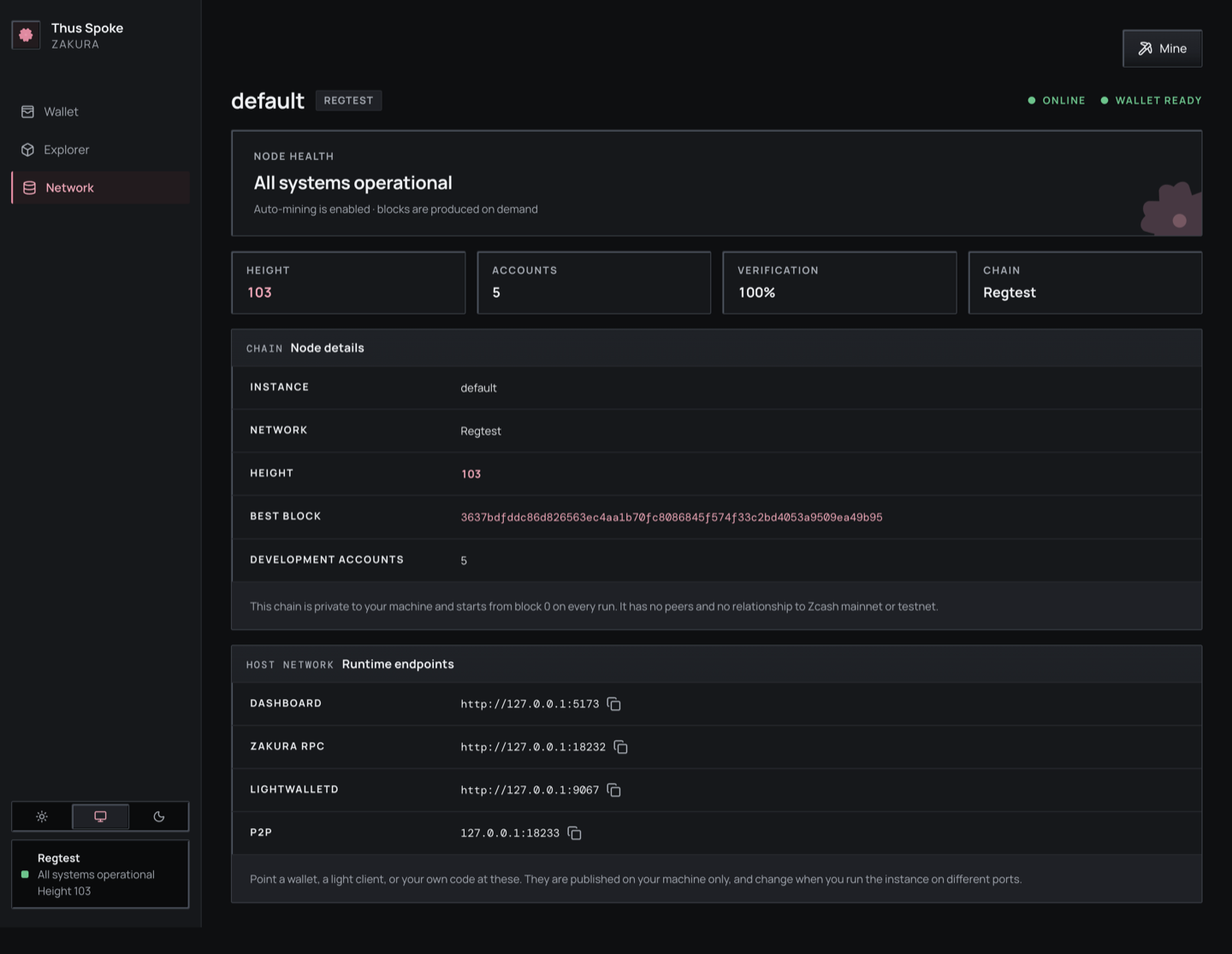
The dashboard Network page shows the same fields for the selected instance.
Use the URLs reported for your running instance.
GET /api/v1/status calls the RPC field zakura_rpc. That naming difference
is a property of the two current responses, not two different nodes.
| Endpoint field | Example use |
|---|---|
dashboard | Base URL for /api/v1/status, /api/v1/accounts, /api/v1/activity, and the UI. |
rpc | Zakura JSON-RPC, such as getblockchaininfo. |
lightwalletd | Compact-block gRPC client connection. |
p2p | Local Zakura peer connection address. |
network | The chain, always "regtest". Assert on it before writing anything. |
tls | Always false. Configure transports as plaintext. |
The four ports are fixed defaults — dashboard 32805, Zakura RPC 18232,
P2P 18233, lightwalletd 9067 — shifted as a block by whatever
--port-offset that instance was started with. So they are stable across
runs of one instance, but they are not a constant of the system: read
ths endpoints --json rather than hard-code them, because you cannot know
another developer’s offset.
Build a small read client
Save the following as read_tsz.py and run python3 read_tsz.py while the
default instance is alive. It uses only Python’s standard library:
import json
import subprocess
import urllib.request

endpoints = json.loads(
    subprocess.check_output(["ths", "endpoints", "--json"], text=True)
)
dashboard = endpoints["dashboard"]


def get_json(path):
    with urllib.request.urlopen(dashboard + path, timeout=10) as response:
        return json.load(response)


status = get_json("/api/v1/status")
if status["wallet_sync"]["state"] != "ready":
    raise SystemExit("Wallet is not ready; inspect /api/v1/status before using balances")
if status["node"] is None:
    raise SystemExit("Zakura did not answer the status query")

print("Node height:", status["node"]["blocks"])
print("Node tip:", status["node"]["bestblockhash"])
for account in get_json("/api/v1/accounts"):
    print(
        f'Account {account["id"]}: '
        f'{account["ironwood_zatoshi"]} Ironwood zatoshi, '
        f'{account["transparent_zatoshi"]} transparent zatoshi'
    )
For a named instance, insert "--name", "alice" before "endpoints"
in the subprocess argument list. If Zakura does not answer the status query,
check the Network page and logs. In a healthy ready instance, the example
prints only user Accounts 1–5. 100000000 zatoshi is 1 ZEC.
GET /api/v1/accounts carries more than balances. Each account object also
has name, unified_address, transparent_address, and
unified_full_viewing_key. The addresses are what you pay from outside the
dashboard; the viewing key lets an external wallet read the Ironwood memos
sent to that account. Inside this environment, the Explorer’s
Decrypt actions button and
GET /api/v1/transactions/{txid}/wallet
show the memos the wallet recorded. Because the
seed is fixed (see Chapter 3),
these values are identical in every instance — convenient for fixtures, and
a reason never to reuse them anywhere real.
For scripts that need the node, compact-block index, and wallet to agree,
GET /api/v1/status also reports settled and settlement_blocker. Use
ths wait before continuing, or ths run -- <command> to run a child command
in a fresh settled instance and clean it up afterward. The child receives the
API URL in THS_API_URL; see the CLI reference.
The explicit ready check matters. GET /api/v1/accounts returns the
last wallet snapshot even while a new scan is in progress or has failed.
Use wallet_sync.observed_height, observed_hash,
fully_scanned_height, and fully_scanned_hash if your application
needs to explain why the node and wallet differ. A same-height
reorganization can change a hash without changing a height.
Listen for changes, then fetch state
GET /api/v1/events is a server-sent event stream. Each update event
contains one topic: wallet, chain, sync, mining, or resync. The event is a hint
to refetch, not a balance or block payload. The dashboard’s query hooks
invalidate the relevant queries when one arrives. A simple terminal view
is:
DASHBOARD_URL="$(ths endpoints --json | python3 -c 'import json,sys; print(json.load(sys.stdin)["dashboard"])')"
curl -N "$DASHBOARD_URL/api/v1/events"
Leave it running, perform a faucet or mine in another terminal, and watch
for update events. Press Ctrl+C to stop the stream. Your client should
read the relevant HTTP endpoint after an event; it should also fetch
fresh state on each connection, cancelling pending older reads first.
The stream has no replay. A mining event prompts a job-status refresh. A resync event means
updates were missed; refetch the state your client uses.
Read chain state directly
This read-only JSON-RPC call asks Zakura for its chain view:
import json
import subprocess
import urllib.request

rpc = json.loads(
    subprocess.check_output(["ths", "endpoints", "--json"], text=True)
)["rpc"]
body = json.dumps(
    {"jsonrpc": "2.0", "id": 1, "method": "getblockchaininfo", "params": []}
).encode()
request = urllib.request.Request(
    rpc, data=body, headers={"Content-Type": "application/json"}
)
with urllib.request.urlopen(request, timeout=10) as response:
    print(json.load(response)["result"])
Save this as chain_info.py and run python3 chain_info.py. The result
describes the node. Use the accounts API for the development wallet’s
balances and the activity API for recorded requests. Do not try to infer
private Ironwood recipients or memo plaintext from raw chain data.
Connect a light client
Pass the lightwalletd endpoint to a lightwalletd-compatible gRPC client
configured for plaintext. You do not have to take that on trust: the
same ths endpoints --json that gave you the address reports "tls": false
alongside it. Some clients expect host:port rather than an http:// URL;
use the form your client library requires.
Read what the wallet recorded about a transaction
The explorer routes return public chain data, which never includes memo plaintext or Ironwood recipients. To check that a payment between development accounts arrived with the right amount and memo, read the local wallet’s record of it:
curl -fsS "$DASHBOARD_URL/api/v1/transactions/$TXID/wallet?account=2"
{
  "txid": "…",
  "status": "confirmed",
  "mined_height": 107,
  "confirmations": 1,
  "fee_zatoshi": 10000,
  "details": "complete",
  "outputs": [
    { "pool": "ironwood", "index": 0, "value_zatoshi": 10000000,
      "from": 1, "to": 2, "to_address": "uregtest1…",
      "change": false, "memo": { "text": "order 42" } }
  ],
  "spends": []
}
accountis optional. Without it, the response covers every development account involved; with it, only the outputs wherefromortois that account, and the notes it spent. Any value other than 1–5, or any other query parameter, returns 400.- A transaction ID the node doesn’t know returns 404. A transaction no
development account is involved in returns 200 with empty
outputsandspends. fromandtoare an account number,"faucet"for an output the faucet paid, ornullfor an address outside the development accounts. The faucet’s own change and spends are never returned.to_addressis the address the wallet recorded when it built the output, or the receiving account’s address for an output it only received.changeis true only for change returned to the account that sent it.memois{"text": …}for a text memo ({"text": ""}for an explicit empty text memo),{"hex": …}with the stored bytes for any other memo, ornullfor no memo (0xF6) or a transparent output.status,mined_heightandconfirmationscome from the node:"pending",nulland0while the transaction is in the mempool.fee_zatoshiis the fee the wallet stored, ornull.
details says whether memos and change flags are final:
details | Meaning |
|---|---|
complete | The wallet has the full transaction. Also complete when nothing can be missing: the wallet has no record of the transaction for accounts 1–5, or every output and spend is transparent. |
pending | The wallet found the transaction by scanning and still has to fetch it in full, so memo can be null until then. An Ironwood transaction stays pending while the wallet keeps retrying. |
unavailable | The wallet gave up fetching the full transaction, so memos may be missing. |
The wallet records a transaction it built as soon as it builds it. A payment
from outside the development accounts appears only after it is mined and the
wallet has scanned its block; before that, the response has empty outputs
and spends.
The rest of the API surface
These are every route the server serves today, from
crates/ths-server/src/api.rs:
| Route | Notes |
|---|---|
GET /api/v1/health | 200 after startup finishes, Zakura and lightwalletd answer, and the wallet has published at least one snapshot; 503 otherwise. The natural readiness probe. |
GET /api/v1/status | Node tip, account count, network, endpoints, wallet_sync, and settlement status. |
GET /api/v1/accounts | Accounts 1–5 with balances, addresses, and viewing keys. |
GET /api/v1/activity | Unified development-wallet history. Supports limit, account, kind, status, and activity-ID before pagination using immutable first-seen order. Each transaction appears once; account arrays retain every affected user account and treasury outputs are hidden. See Chapter 6. |
GET /api/v1/activity?idempotency_key=<key> | Read one payment’s stored activity as a one-item array, or []; the read does not resume it. |
POST /api/v1/send/quote | Dry run: available_zatoshi, fee_zatoshi, max_zatoshi for one account and pool pair. Builds and broadcasts nothing. Check an intended amount against max_zatoshi before calling send. Returns 503 while the environment is still starting, like send and faucet. |
POST /api/v1/send | Payment to a user account or supported Regtest address. Needs an idempotency key. |
POST /api/v1/faucet | Treasury payment to an account. Needs an idempotency key. |
POST /api/v1/faucet/address | Treasury payment to a supported Regtest address. Needs an idempotency key; external recipients have a separate stored faucet record. |
GET /api/v1/faucet/address?idempotency_key=<key> | Read an internal or external address-faucet result, or 404 if none is stored. |
POST /api/v1/mine | Generate 1–10,000 blocks and wait for wallet synchronization. Each call uses a fresh internal key. |
POST /api/v1/reorg | {depth, keep_txs?} removes recent blocks and mines replacements. Returns old/new tips, block hashes, and best-effort transaction-retention results. |
POST /api/v1/rollback | {depth} removes recent blocks without replacements and reconciles the wallet. Neither chain-changing POST is automatically retried. |
POST /api/v1/mining/jobs | Start a keyed mining job with {blocks,idempotency_key}; returns HTTP 202 and the job. |
GET /api/v1/mining/jobs, /mining/jobs/{id} | Read the latest job or a specific job; see Chapter 5. |
POST /api/v1/zip321/parse | Parse one Regtest payment URI into its address, pool, optional amount, and memo; moves no funds. |
POST /api/v1/zip321/request | Generate a payment URI from {account_id} and an optional amount and memo; moves no funds. |
POST /api/v1/transactions/decode | Decode one raw transaction from {hex} into its txid, version, branch ID, expiry height, transparent inputs and outputs, and shielded counts and value balances; broadcasts nothing. |
POST /api/v1/dev/seed | Returns the raw seed hex. Refuses unless the body carries "confirmation": "I understand this seed is for regtest only". |
GET /api/v1/blocks, /blocks/{id}, /transactions/{txid}, /mempool, /addresses/{address}, /search | Read-only explorer views of public chain data. Block lists include transaction IDs in tx; block detail includes full transaction objects. An empty or whitespace-only /search query is HTTP 400 and is not sent to Zakura. An address with surrounding whitespace is HTTP 400 from /addresses/{address} and from /search. |
GET /api/v1/transactions/{txid}/wallet[?account=N] | What the local wallet recorded about one transaction for accounts 1–5: outputs, change, memos, spends, and fee. See above. |
GET /api/v1/events | The server-sent stream described above. |
Accepted payment intents now progress in the background, including payments to external faucet addresses. A successful response can still describe a pending payment; read its stored status before choosing whether to replay it.
Chapter 6 explains the retry boundaries around payment and mining requests. These interfaces are for local Regtest experiments; keep them on loopback and verify the current source before building a long-lived integration.
What you learned: choose an endpoint by state ownership, then check wallet readiness before using a balance. Next: use the CLI reference, source development guide, or troubleshooting guide as your experiment needs.